How we render 3D videos for free: Blender, three.js and cloud GPUs
Our two short films took one laptop all night. Then our reels moved from Blender to three.js, then to cloud GPUs on Modal, all inside $30 of free credit a month.
 , 8 min read
Everything we make is drawn on one laptop. It has a 12th-generation Intel Core i5, the Iris Xe graphics that came with it, 16 GB of memory, and an editor and a few other jobs open on it all day. In one week our 3D videos went from rendering on it all night to rendering in a few minutes on graphics cards in the cloud, and we have not paid for any of it yet. Here is how, with the real numbers, every service we looked at, and what we learned.
Two films, rendered overnight
PLUMB and HIGH MOON are our first two short films, both made in Blender. PLUMB is 114 seconds of a robed figure on a giant tilting stone board, where spheres 120 m across roll until something stops them. HIGH MOON is a western on the Moon: two astronauts settle a duel by flicking marbles 384,000 km into a hole on Earth.
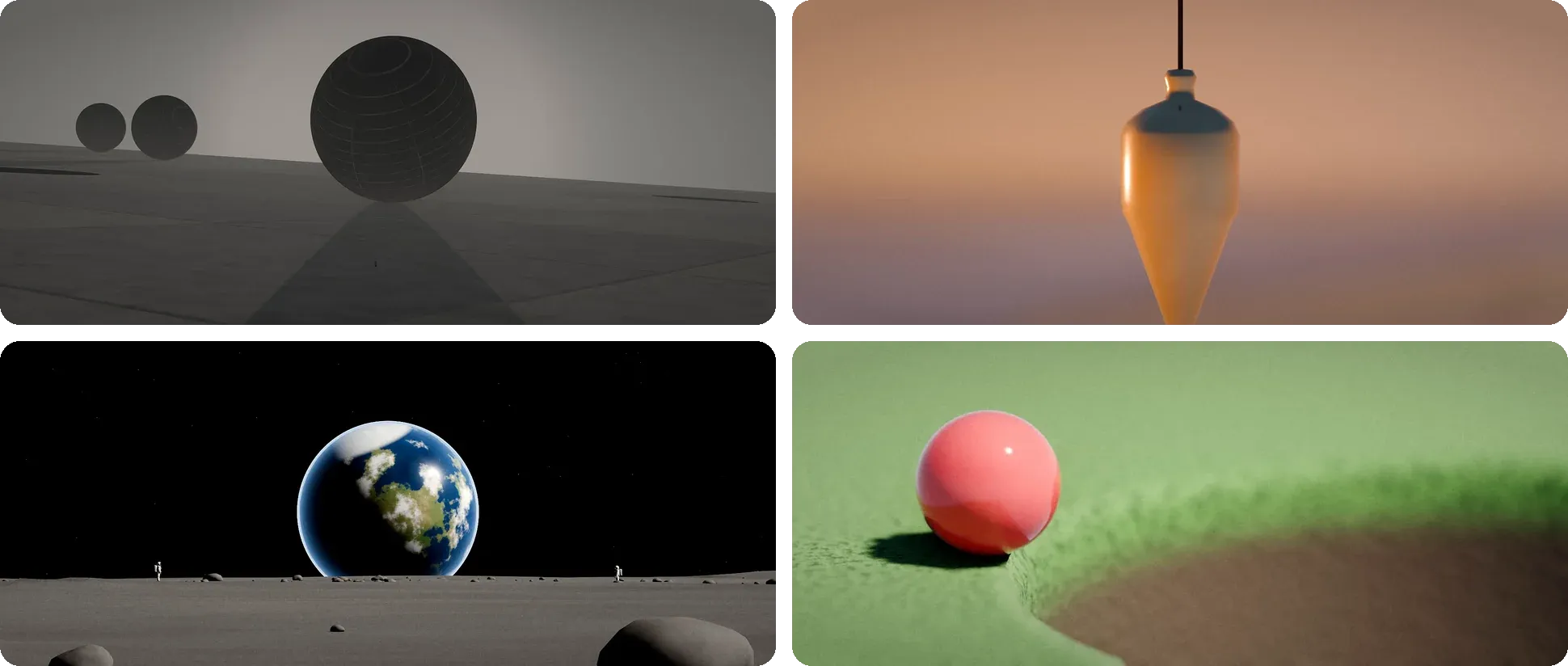
Blender’s EEVEE renderer drew PLUMB’s 2,736 final frames at 6 to 13 seconds each. Its final render ran from about 2 am to 7 am on 13 November.
HIGH MOON took longer. Its gold visor close-ups render with Cycles on the processor, because EEVEE’s reflections blurred the rival reflected in the gold. Its final render started at 4:11 pm on 13 November and finished at 9:31 the next morning: 17 hours and 20 minutes for 2,796 frames, about 22 seconds a frame. In those 17 hours it used 6 days, 9 hours and 53 minutes of processor time. The laptop has 16 threads, and that night it used every one of them.
The hard part was not the time, it was the memory. When this laptop runs out of memory, the system stops whatever it must, and that can be the editor with all its work. So every render runs as its own background service with a memory cap, using systemd’s MemoryMax, at about 3 GB for the films. It writes every frame to disk as soon as it is drawn, and if it is stopped, it starts again from the last frame on disk. HIGH MOON still peaked at 3.1 GB, with another 927 MB pushed out to swap.
Films can wait for a night. Reels cannot.
The music machine started in Blender too
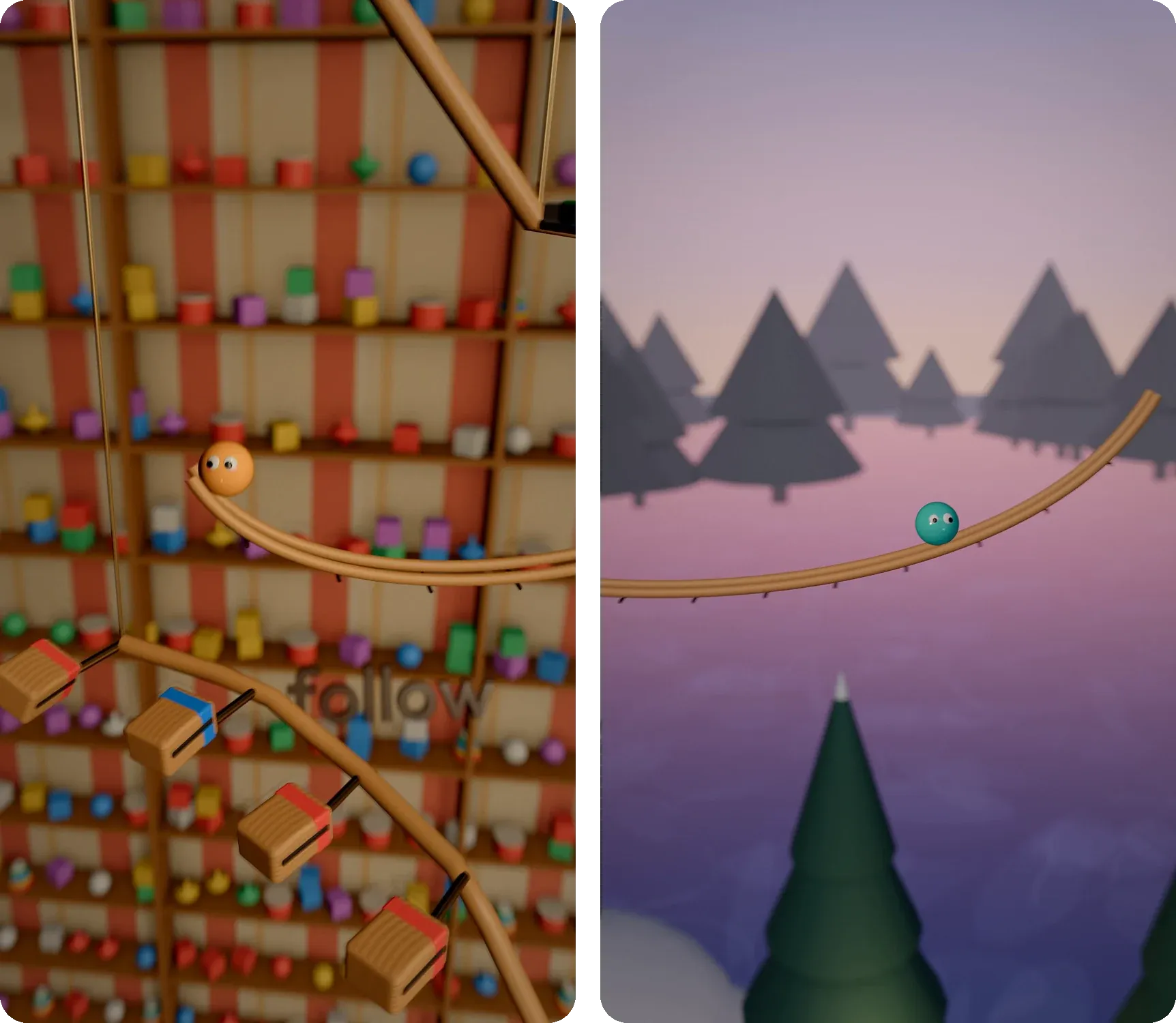
On 15 November we made our first marble music machine: Steve, Plumb’s teal marble, falling through bells and tiles that play Ode to Joy. The 19-second test was rendered in Blender at 8.5 seconds a frame, 86 minutes for 583 frames. Blender’s memory crept up over the long run, and under its 1.8 GB cap it was stopped and restarted from disk five times before the end.
The full 40-second Ode to Joy reel was rendered at 900 x 1600 and scaled up, to stay under the cap. That was still 4.8 to 6.2 seconds a frame, and about two hours for the reel. At that pace, a few reels a week meant the laptop rendering most of every day.
Then three.js
So I asked if the same reels could be made without Blender, faster. We kept the same plan of the machine and drew it with three.js, a 3D library for the web, in Chrome on the laptop’s own graphics chip. Each frame averages many pictures, each a little apart in time and in the lens, for motion blur, soft focus and soft shadows.
The first test drew a frame in 1.19 seconds at full 1080 x 1920 with 32 pictures, against 4.8 to 8.5 seconds in Blender. It used about 1.0 to 1.15 GB of memory, against Blender’s 1.5 to 1.8 GB.
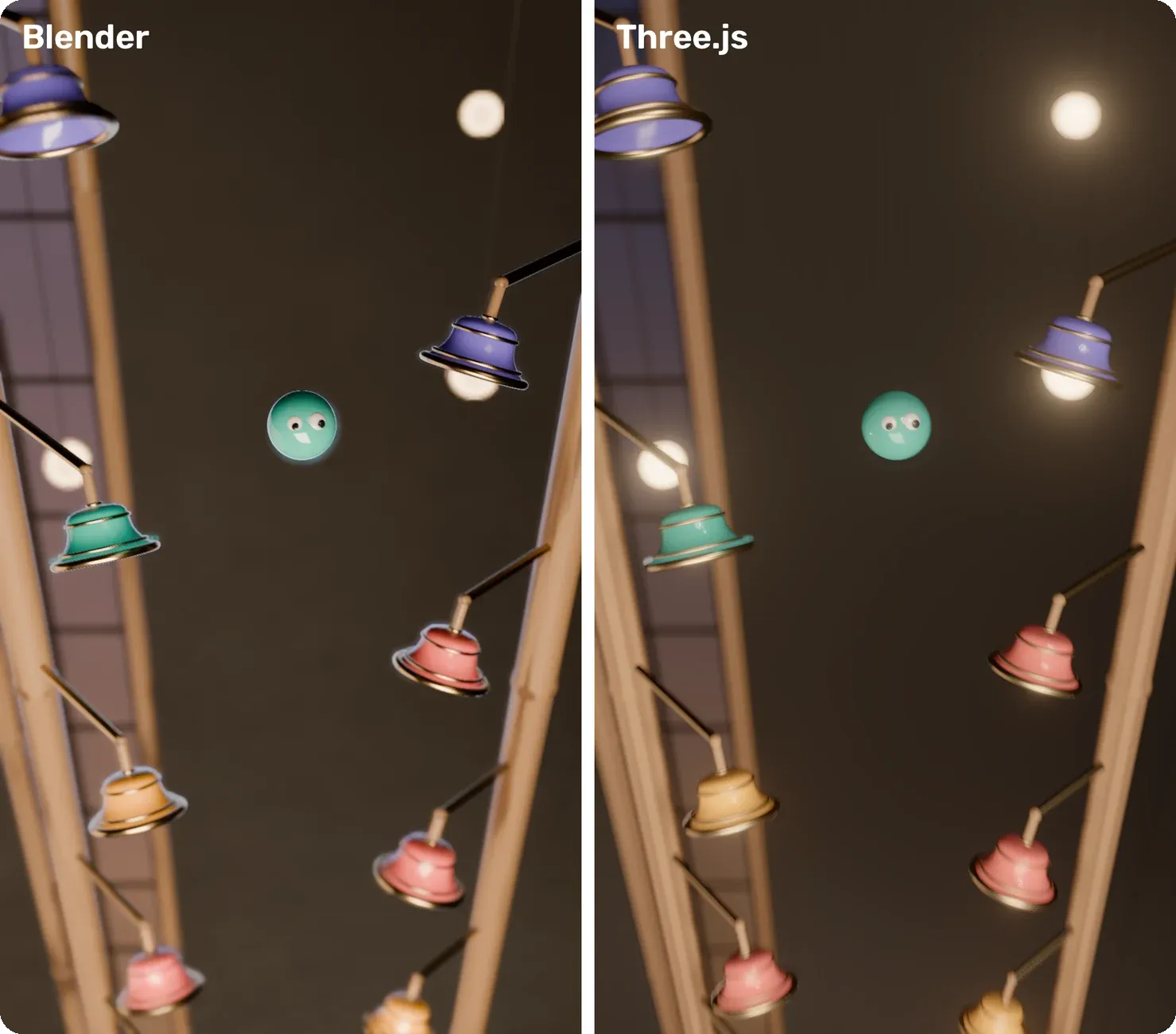
On a phone, it was close enough. three.js even had cleaner edges: Blender’s final left a pale halo round Steve and the bells. What it gave up was Blender’s real light: no ray-traced reflections, no light bouncing between surfaces and no real haze, so glass and chrome look a little weaker.

Then rooms full of out-of-focus lamps showed speckles at 32 pictures a frame. At 96 they are close to smooth, but a frame takes 4.4 seconds on the laptop, and a 43-second reel about 95 minutes. So we were nearly back where we started, just with nicer edges.
Every option we looked at
The slow part is the graphics chip, so we looked at where else the frames could be drawn.
- A new machine. By our guess, an NVIDIA RTX graphics card and 32 GB of memory would be about ten times faster, and the memory cap would go away. It costs real money, which our games have not earned yet.
- Kaggle notebooks. Kaggle gives a weekly quota of free GPU time, but it is built for data science notebooks, not a queue of render jobs.
- Google Colab’s free tier. A GPU when one is free, in short sessions, and Colab says its resources are not guaranteed.
- SheepIt. A free community render farm, where people’s computers render each other’s Blender frames. It only renders Blender, so our three.js reels cannot use it.
- RunPod and Vast.ai. Rented GPUs by the hour. RunPod lists an RTX 4090 at $0.89 an hour on its secure cloud. Good, but paid from the first minute.
- GitHub Actions. Free on public repositories, with about 20 jobs at once. We ran it with every job encrypted, so the public side only ever shows unreadable files. But its machines have no graphics card, so Chrome falls back to drawing in software with Mesa’s llvmpipe. A frame took 65 to 117 seconds, about 30 machine-hours for one reel.
- CPU-only free tiers. Oracle Cloud’s Always Free machines and Buildkite’s free plan came up for light jobs. Without a graphics card they would be no faster than GitHub, so we left them.
- Modal. Cloud GPUs billed by the second, and its free Starter plan includes $30 of credit a month. I already had an account with that credit. Modal even has an example of rendering Blender on many GPUs at once.
Modal was the one to test first. The unknown was whether Chrome could reach Modal’s graphics cards at all, since Modal is built mostly for compute, not for drawing. It could, through ANGLE, the layer Chrome uses for its graphics.
The numbers on Modal
On 16 November we drew the can-can reel, 1,289 frames at 96 pictures each, everywhere at once.
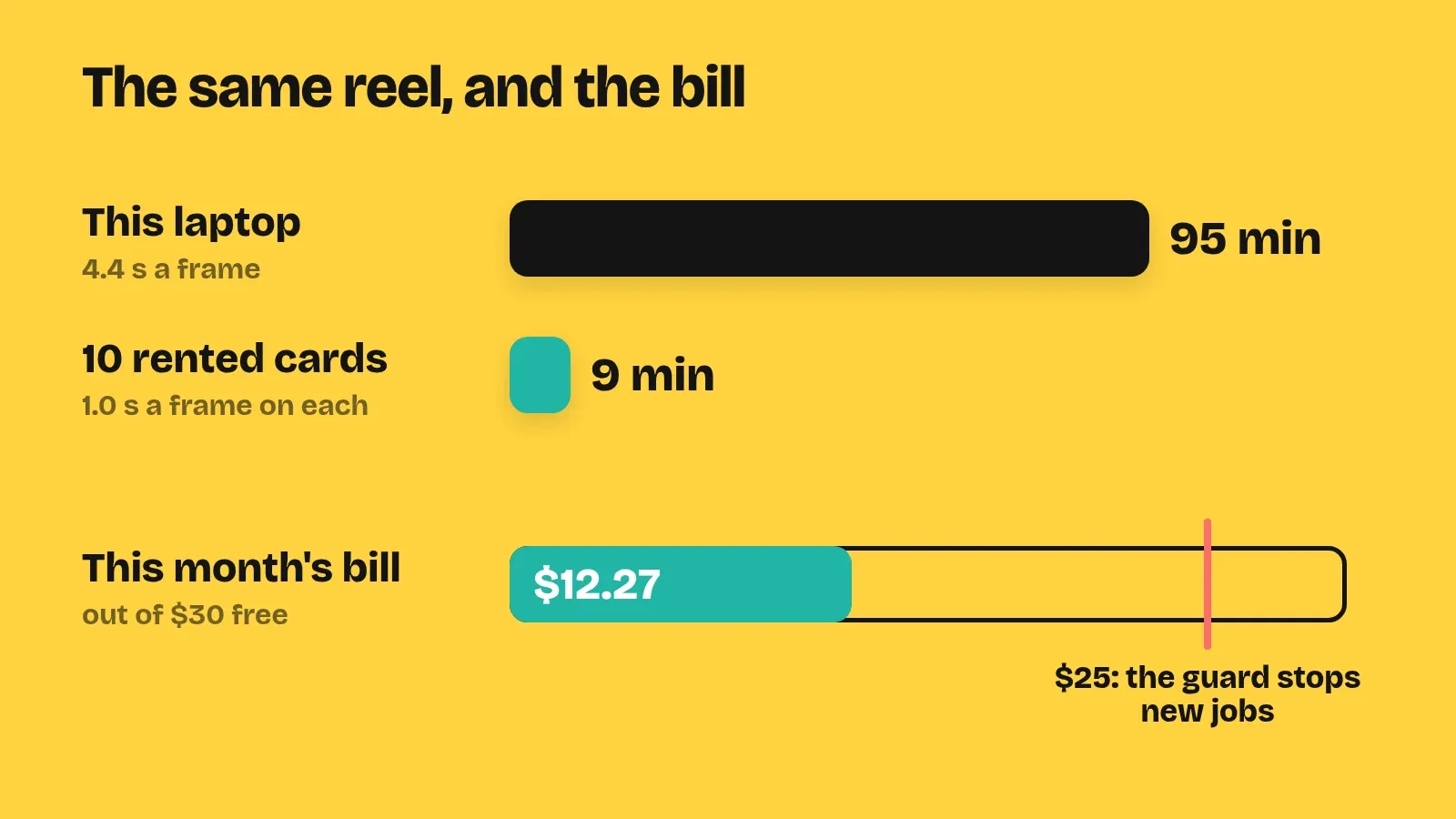
- An NVIDIA T4 on Modal: 1.0 second a frame, against the laptop’s 4.4. Modal lists the T4 at $0.000164 a second, about $0.59 an hour.
- A whole reel: 9 minutes on 10 cards, 3.5 of them drawing and 5 downloading, for about $0.30.
- The look: within half a level, out of 255, of the laptop’s own frames.
- A newer L4 card: it waited 1 to 13 minutes to start, then drew at 1.7 seconds a frame. Most of a frame’s time goes to Chrome and Modal’s own wrapping, not the card, so the cheaper T4 stayed.
The Starter plan runs at most 10 GPUs at once, so our farm stops at 8, which leaves room for a quick test while a reel is drawing.
A guard on the bill
Free credit is only free until it runs out. So before every job, the farm reads this month’s bill and the job’s worst case, and refuses the job if the two together would pass $25. That keeps $5 of room under the free $30. If it cannot read the bill at all, it refuses too, and points us back to the laptop.
So far this month Modal has used $12.27. That covered about 15 reels and their finishing, and saved the laptop about 25 hours of rendering.
What we learned
- Try a few frames first. The toy shop in The Entertainer has hundreds of separate little toys. Modal’s containers have only 2 processor cores, so drawing many separate things costs more there than on the laptop. It drew at 9 seconds a frame, every chunk ran out of time, and about $1.30 went for nothing. Joining the room’s still toys into one object per material brought it down to 2.2 seconds. Now every new room gets 5 to 10 test frames before a whole reel goes up.
- Download in parallel too. Eight downloads at once came at about 6 MB/s, and one at a time at about 1 MB/s.
- Keep the slow free option. GitHub’s machines stay a backup for when the credit runs out.
The laptop still films the real games. And it no longer has to choose between a reel and the rest of the day’s work.
Related: Backing up our videos to Telegram, eight connections at a time, where the finished reels go next.
Sources
- Blender Foundation. EEVEE and Cycles, in the Blender Manual.
- systemd authors. systemd.resource-control: MemoryMax.
- The three.js authors. three.js.
- Kaggle. Efficient GPU Usage Tips.
- Google. Colab FAQ.
- SheepIt. SheepIt Render Farm.
- RunPod. GPU Cloud Pricing.
- Vast.ai. Pricing.
- GitHub. GitHub Actions billing and GitHub-hosted runners.
- Mesa. LLVMpipe.
- Oracle. Oracle Cloud Free Tier.
- Buildkite. Pricing.
- Modal. Plan pricing, GPU acceleration and Render a video with Blender on many GPUs or CPUs in parallel.
- Google. ANGLE.