 Plumb
Pits, undo and restart: Plumb lets you be wrong
How Plumb's square pits work, what Undo and Restart give back, and how to use them to explore a board, since a mistake costs one tap and nothing else.
 , updated , 3 min read
I wanted a mistake in Plumb to cost almost nothing. Not because the puzzles are easy, but because the quickest way to understand a board is to try something and watch what happens. So a wrong swipe takes one tap to undo, even the one kind of swipe that ends an attempt.
What a pit does
Pits arrive in chapter 3, on level 41. A pit is a dark square sunk into the board, and any marble that rolls onto it falls in, whatever its colour, which ends the attempt. A hole only takes its own colour, but a pit takes everything. Pits are never decoration either: on every level with one, some swipes within the length of the goal would drop a marble into it, and that is checked whenever the game changes.
A trap you can see coming
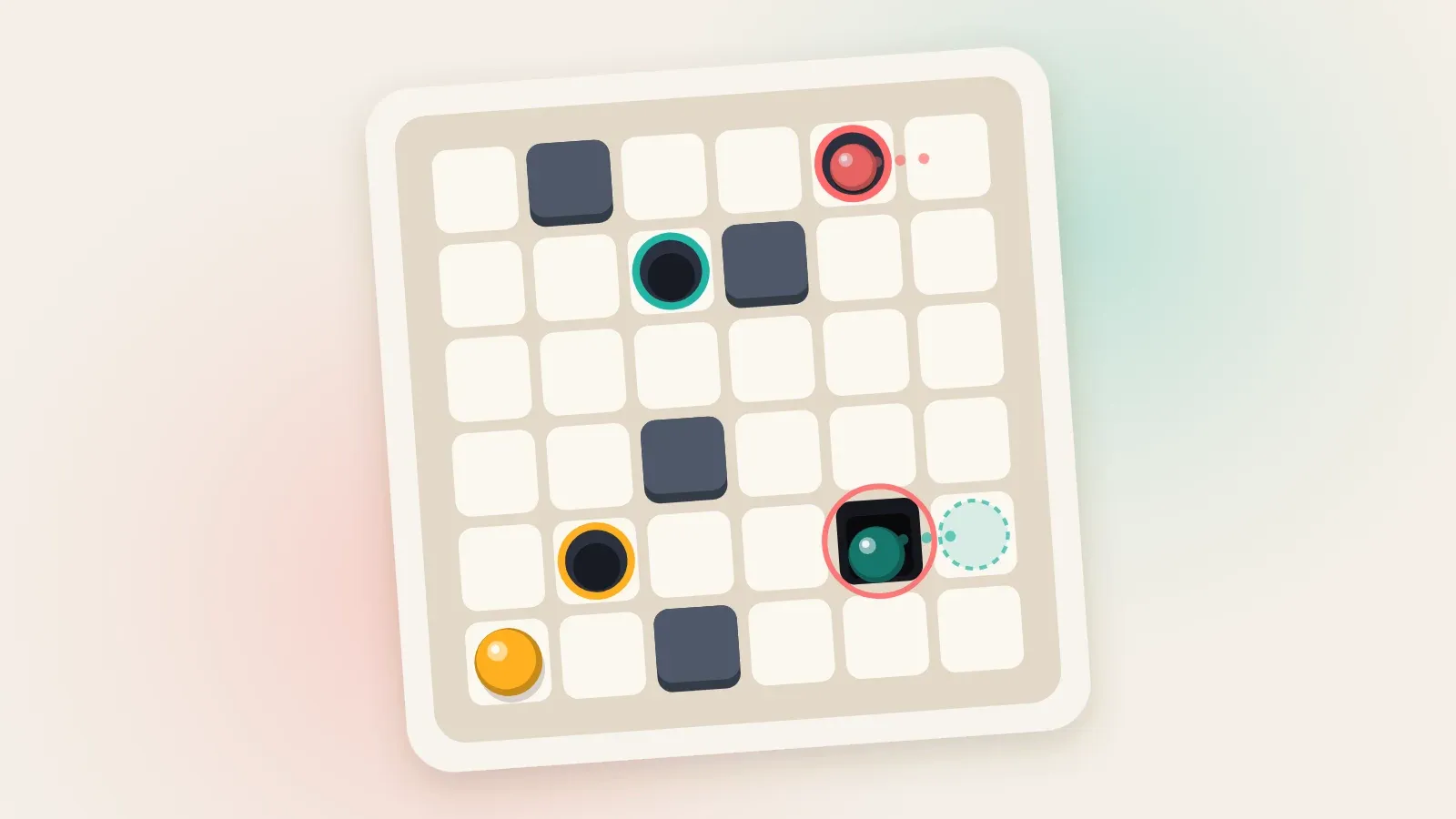
The board at the top of this post is level 44. The red marble sits in the top right corner beside its hole, and the teal marble sits lower down the same edge, just as close to the pit. Swipe left and both happen at once: the red marble drops home and the teal one drops into the pit.
The route that meets the goal of six starts by getting the teal marble off that row. Swipe right, and only the yellow marble moves, one cell along the bottom. Swipe up, and the yellow marble drops into its hole while the teal one rolls up the edge and stops under the red marble. Swipe left, and the red marble drops home while the teal one steps off the edge, never to go near the pit again. Three more swipes, up, left and down, bring it home.
If you cannot see a safe way, ask for a hint. Its search never steps onto a board with a marble down a pit, so it never suggests a swipe that loses one.
Undo, Restart, and what they cost
When a marble falls, a sheet rises that says Down the pit, and its biggest button is Undo. Undo puts the board back as it was before that swipe, move count included, and you can keep undoing all the way to the start. Restart puts every marble back where the level began and sets the count to zero.
Stars only look at the moves in the solve you finish, so neither button ever costs you a star. The only thing they cost is a line on the win sheet: “First try, and perfect.” is kept for a perfect first solve with no undo or restart on the way.
Exploring on purpose
Because a tilt costs nothing to take back, you can test ideas on the board itself.
- Map the first move. Swipe each of the four ways and undo after each one, and you have seen every board one tilt from the start.
- Use the star meter as a budget. The third star goes out the moment your moves reach the goal with marbles still on the board, and one undo lights it again, so you can feel your way along a route and know when it has run long.
- Restart when the trail goes cold. A fresh board is easier to read than a long chain of undos.
Dead ends without a fall
From chapter 5 on, some tiles change the board for good: cracked floor gives way into a pit once a marble has rolled off it, a plug closes after taking one marble, and a one-way gate will not let a marble back. So a board can become impossible with every marble still on it. If the hint finds no way home from where you are, it says “No way home from here. Undo or restart”, and that costs you nothing.
Why there are no lives
Plumb has no lives, no hearts and no timer. A marble down a pit tells you something true about the board, and I would rather you used that than paid for it. The wider thinking is in calm by design.